Telegram
Connect Telegram to your assistant, receive scheduled results, and manage or remove a connected chat.
The assistant that answers on Home can live in a Telegram chat as well. The same memory answers in both places, and anything a schedule produces is delivered to that chat. Telegram is not an MCP client: it is a second door to the one assistant, not a reader of your Memories from outside.
Before you start
Section titled “Before you start”- Telegram on your phone.
- An account whose assistant has a working model under AI Setup; the chat answers with the same model as Home.
Set up
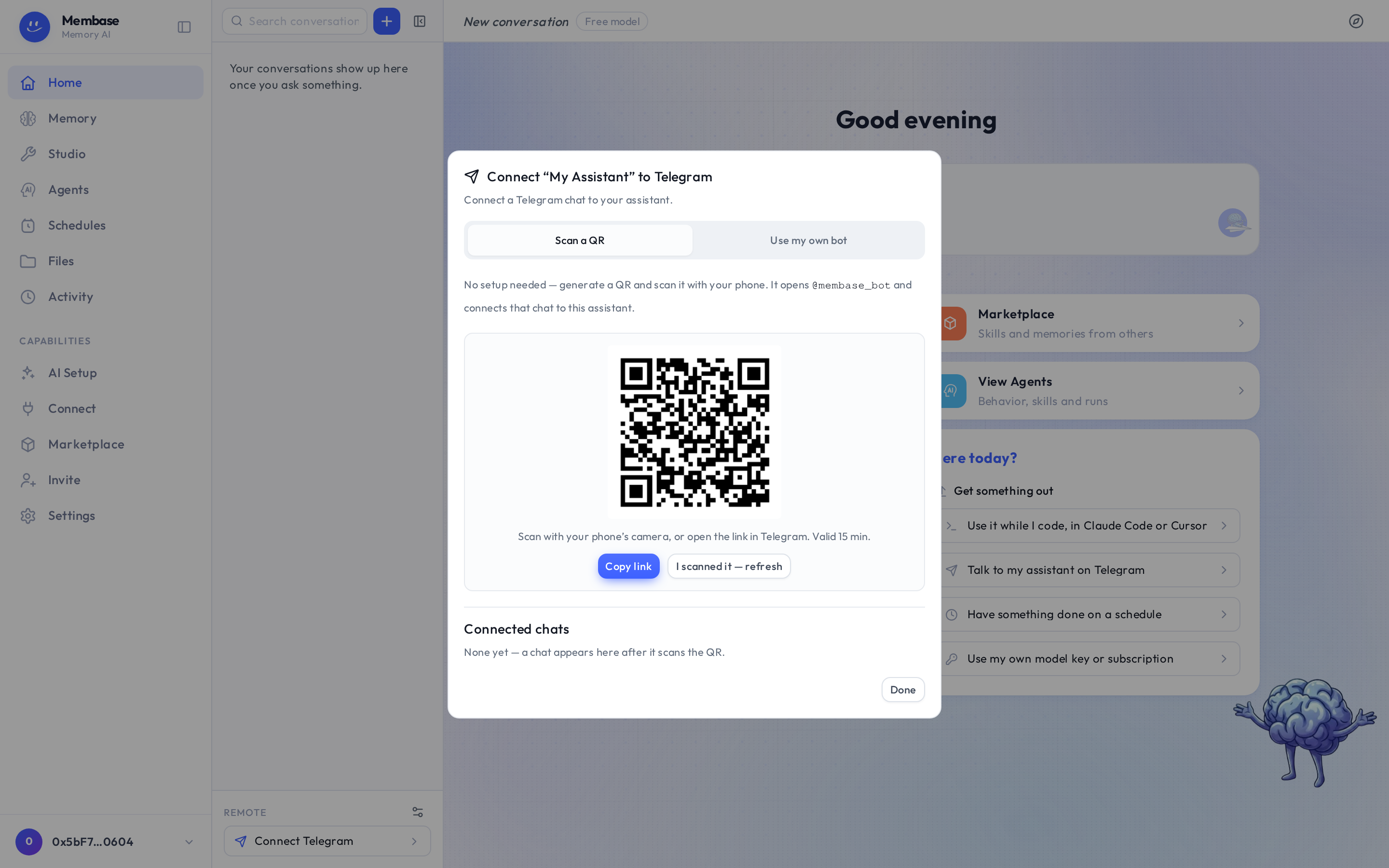
Section titled “Set up”- On Home, at the foot of the conversation rail under Remote, press Connect Telegram.
- In the dialog keep Scan a QR code and press Generate QR code.
- Scan the QR with your phone’s camera, or press Copy link and open the link in Telegram. Either way Telegram opens the Membase bot with a one-time code already filled in; send it.
- Back in the dialog press Check connection. The chat appears under Connected chats, and the Remote row on Home now opens that chat.
The code is single-use, valid for 15 minutes and tied to your account. Nothing is connected until the bot actually receives it from your phone.
Your own bot
Section titled “Your own bot”If you would rather not share the Membase bot, pick Use a custom bot. Create a bot with
@BotFather in Telegram (send it /newbot), paste the bot token the dialog asks for, then
generate the QR the same way. The optional Webhook secret token is for operators who run
their own webhook and can be left empty.
What it can do
Section titled “What it can do”- Talk to the assistant. Ask anything you would ask on Home. It reads the same Memories and keeps the same instructions.
- Receive scheduled results. When a Memory or an agent on a schedule finishes a run, its result is sent to this chat. There is nothing to configure.
- Read it on Home. The Remote row opens a read-only view of the Telegram chat, so what you said on your phone is there when you are back at your desk.
The Telegram chat is its own conversation. It does not appear in the day-grouped list on Home, and Home’s conversations do not appear in Telegram; the memory is what they share.
Which Memories it uses
Section titled “Which Memories it uses”The assistant’s: the Memories listed in the assistant’s own settings on Home (the ⚙ Assistant settings button beside Remote, at the foot of the conversation rail). There is no switch on Connect for Telegram, because Telegram is the assistant, not an app reading it.
Remove it
Section titled “Remove it”Open Assistant settings (the ⚙ beside Remote) and press Disconnect in its Telegram section. The connection dialog (Home’s Connect Telegram quick action) also lists Connected chats with a Delete per chat. The bot stops answering that chat at once, and scheduled results stop going there.
If something looks wrong
Section titled “If something looks wrong”| It says | What it means | Do |
|---|---|---|
| the bot never answers the code | the code expired (15 minutes) or was already used | generate a new QR |
| the chat answers on the phone but nothing shows under Remote | press Check connection | |
| a scheduled result never reached Telegram | no chat is bound | Home › Remote › Connect Telegram |
| the chat answers Intelligence is off | the assistant has no working model | AI Setup › Connect a model source |