Concepts
Understand Memories, sources, files, connected apps and agents, and manage access or deletion.
Membase turns your material into memory that your assistant and connected AI apps can use.
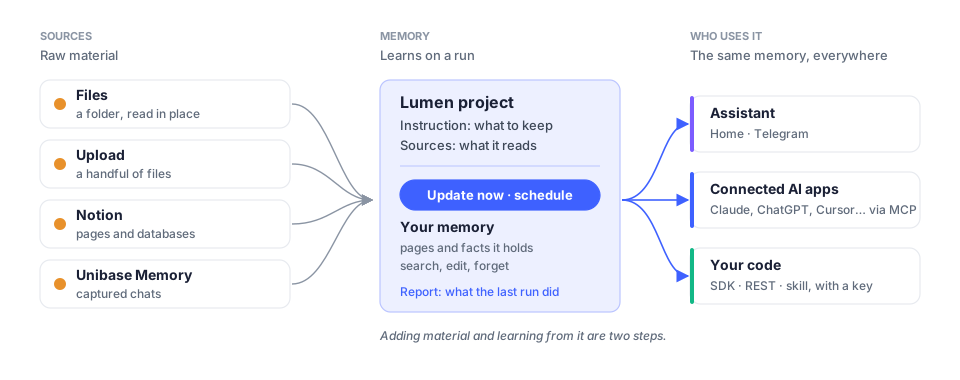
Assistant. Your built-in assistant, available on Home and through a connected Telegram chat. It can use the memories and skills selected in its settings.
Memory. A named collection of information about a topic, such as project decisions or reading notes. Set what it should retain, add sources, and choose a schedule if needed.
Source. Material a Memory learns from: a folder in Files, uploaded documents, selected Notion pages, or conversations imported through the Unibase Memory browser extension.
Files. Your file manager. Organize documents into folders and connect a folder to a Memory. System folders such as Generated, Assets and Trash have separate purposes and controls.
Connect. Manage access for external AI apps and developer keys. Choose the Memories each connection can use and revoke access when it is no longer needed.
Agents. Additional agents you configure for specific tasks. Use Studio to build their workflows and Agents to manage their settings and runs.
Marketplace. Browse skills and memory listings. A memory listing provides access to an agent that answers from the seller’s Memory; check its Included access before purchasing.
What runs when
Section titled “What runs when”Adding or syncing a source makes material available to a Memory. Select Update now to
process it, or configure a schedule. Check the run’s Report to see whether it completed.
An integration using add_document can also request learning through the API.
Stopping and undoing
Section titled “Stopping and undoing”Access controls, deletion and billing have different effects. Read the confirmation for the selected action; subscription timing is shown in the relevant plan or purchase details.
| Action | Effect | Recovery |
|---|---|---|
| Switch off a Memory under Use in | removes that connection’s access to the Memory | switch it on again |
| Disconnect… an app | revokes its Membase approvals | authorize the app again |
| Revoke… a developer key | stops subsequent requests using that key | create a new key |
| Remove a source from a Memory | stops that Memory reading the source | add the source again |
| Pause a schedule | stops future scheduled runs | resume the schedule |
| End a conversation | keeps its transcript readable and stops new turns | start or branch a conversation |
| Delete… a Memory | permanently removes its stored content and affects dependent agents or listings | cannot restore from Trash |
| Delete conversation | removes the transcript; previously saved memory is retained | cannot undo |
| Delete everything in Settings | removes account data; retains the sign-in identity | cannot undo |
Changing access does not remove content an external app has already received. Removing a source from a Memory does not by itself erase information previously learned from it. Review and edit learned content on the Memory page when needed.
Before deleting
Section titled “Before deleting”Read the affected items in the confirmation, including dependent agents, workflows and
subscriber access. Download data you want to keep and check for export warnings before
continuing. The account-data deletion flow requires typing delete everything.
Export and account-data deletion.