Bring your material in
Choose how to bring in files, Notion pages or captured conversations, and learn when a Memory reads them.
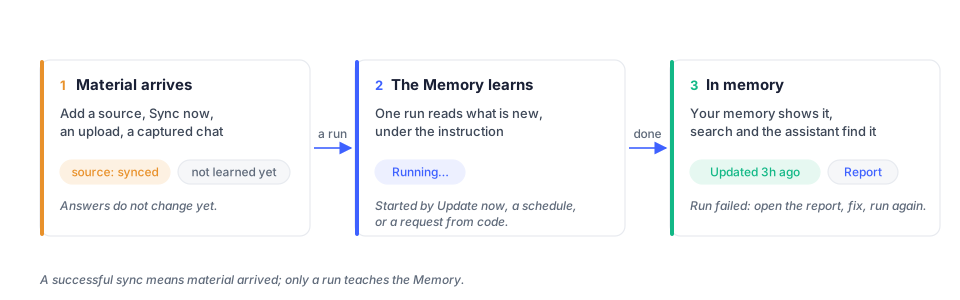
Choose the source that fits your material. Files, uploads, Notion and captured conversations feed a Memory through its Add card; the Memory learns from them when you run it. Talking to your assistant follows a different path: it can save what matters during the conversation.
| Way in | Good for | Where |
|---|---|---|
| A folder in your Files | a project, a vault, anything already on disk | memory page › Add card › Your Files › Choose |
| Upload | a handful of files | memory page › Add card › Upload files › Upload |
| Notion | pages and databases | memory page › Add card › Notion (where available) |
| Browser extension | your chats with other assistants | memory page › Add card › Unibase memory |
| Talking to your assistant | what you tell it, decide with it, ask it | Home, or Telegram |
A folder in your Files
Section titled “A folder in your Files”Press Choose on Your Files. The Files browser opens inside the dialog: browse, tick one or more folders, and confirm in the footer. The folder is read in place, so anything you later add to it is picked up on the memory’s next run. A folder the memory already reads says reading.
If the files are not in your Files yet, put them there first from the Files page, or upload.
Upload
Section titled “Upload”Press Upload on Upload files and drop the files. They land in a folder named
“
Notion
Section titled “Notion”Connect a workspace, select the pages or databases the Memory should read, and add them. A sync fetches those pages; the Memory still needs a run to learn from them. Follow the Notion guide for authorization, page selection, updates and disconnection.
Unibase memory
Section titled “Unibase memory”The Unibase Memory browser extension captures your conversations with other assistants and hands them to a memory as a source.
- Press Install on Unibase memory. Once the extension is connected, the same door says Use here.
- Press Use here. The door says Added and the source appears in the Add card.
- Select Update now.
A memory over your conversations keeps memory about you: what you asked, decided, adopted. It does not restate what an assistant explained. Its instruction is a filter on the chats, not a subject: unibase keeps what the chats say that bears on Unibase, not a description of Unibase.
Talking to your assistant
Section titled “Talking to your assistant”Your assistant can retain relevant information from conversations on Home or Telegram. A Saved to memory indication shows when information has been saved. Review the assistant’s memory on the Memory page; do not assume every message has been stored as a memory entry.
The browser extension guide covers setup and missing conversations.
Then run
Section titled “Then run”After adding a source, select Update now on the Memory page or configure a schedule in Settings. See Memory.