Authentication & Scopes
Every call carries a bearer. What the two credentials are, what an access level grants, what reach and the profile tick add, and how a key ends.
Every request to https://api.app.membase.io carries one header:
Authorization: Bearer <credential>There is no API-wide key, no client secret and no signature. The credential itself says who the caller is, which Memories it may touch, and what it may do to them. Both kinds of credential are minted by the account’s owner and can be narrowed or revoked by them at any time; the change applies on the credential’s next call.
The two credentials
Section titled “The two credentials”| Developer key | Consent token | |
|---|---|---|
| Minted by | the owner, under Connect › Developer keys | the owner, approving an app on the OAuth consent screen |
| Held by | code the owner runs: a script, a server, an SDK, an AI running the skill | an AI app: Claude, ChatGPT, Cursor, Codex, Grok, Kimi… |
| Shape | mbk_<key id>_<token>, shown once; the key’s page keeps a hint such as mbk_7f3a92d1…c91e |
opaque; the app stores it |
| Access | Read, Read & write or Full access, chosen at creation and changeable in place | read-only, always |
| Reach | the Memories ticked on the key, or all, including later ones | the Memories ticked on consent |
| Profile | when Your profile is ticked | when Profile access is ticked at consent; to change it, disconnect and authorize again |
| Can confirm a removal | yes, with confirm=true |
never |
| Expires | never, 30 days, 90 days or a year | at the end of the token’s lifetime; there is no refresh, the app authorizes again and the owner re-approves |
Which one you need: if your code holds the credential, a developer key. If the user’s AI app holds it, consent through MCP, and your code never sees a token at all. The Connect your AI tab is the consent path; the rest of this page is mostly about keys.
Access levels
Section titled “Access levels”A level is a set of operations. Each level adds to the one before it.
| Level | Grant | Operations |
|---|---|---|
| Read | read |
list_containers, search_memories, get_profile (with the profile tick), list_documents, get_document (REST only), memory_rules |
| Read & write | suggest |
Read, plus add_memory, add_document |
| Full access | manage |
Read & write, plus delete_document, forget_memory, each only with confirm=true |
ask_agent is on no developer key, at any level: only a credential that exposes an agent
(a marketplace subscription, a share) holds it; from a key the call is refused with 403
like any verb outside its grant. workflow_invoke belongs to workflow exposures and is not
on any key either. The API reference lists each level’s ceiling from
the tool table itself, which is why ask_agent appears under Read there; a key never
reaches it.
A call above the key’s level is refused with 403 and code: unauthorized, and the key’s
page counts it as a refused call (ask_agent excepted: that refusal is not recorded). The
level can be raised or lowered on the key’s page without re-minting; the token stays the
same and the next call reads the new grant.
Reach is the list of Memories (containers, in the API) a credential may use. It is switched on the Connect page, on the key’s page under Memory access, or on a Memory’s own page under Use in; all three are the same switch. A key created with All memories, including ones you make later reaches every container the account has now or later.
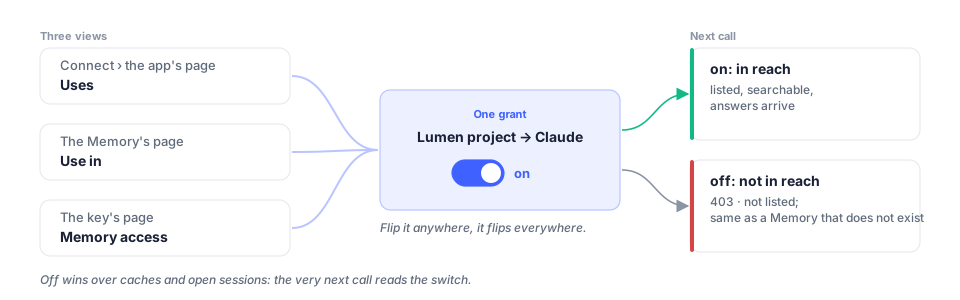
A container outside the reach is refused exactly like one that does not exist: 403,
code: unauthorized, may not use that container. list_containers never lists it, so a
client cannot tell withheld from absent. With exactly one container in reach the container
field may be omitted on add_memory; with more than one it is required.
The profile tick
Section titled “The profile tick”The profile is the standing facts the assistant keeps about the person: static (who they
are, lasting preferences) and dynamic (what changed recently). It is not part of any
container, so reach does not cover it. A credential reads it with get_profile only when the
owner ticked Your profile on the key or Profile access on consent. Without the
tick the operation is not offered at all. On a consent connection the tick is set only at
consent; to change it, the owner disconnects the app and authorizes it again.
Destructive operations
Section titled “Destructive operations”delete_document and forget_memory need Full access, and even then they do not run on
their own: a call without confirm=true answers 200 with
{ "status": "confirmation_required", "verb": "delete_document", "how": "…" }and the how sentence is what to relay to the person. Pass confirm=true only after they
agreed; from a developer key that counts as the owner’s confirmation. A consent token is
never offered these verbs at all, so from an AI app the call is refused with 403 · unauthorized · tool 'delete_document' is not in this agent's capability profile, not
answered with the sentence.
Expiry, rotation, revocation
Section titled “Expiry, rotation, revocation”- Expiry is chosen at creation (never, 30 days, 90 days or a year in the app; any 1–3650 days through the API) and cannot be extended on an existing key; rotate instead. An expired key answers
403withcode: unauthorized, and its row moves to Expired. - Rotate… pre-fills a new key with the old key’s level, reach, profile tick and the same expiry duration counted from now, and asks what to do with the old one. By default the old one keeps working until you revoke it, so you can swap the value in your environment first. From the API you pass those fields yourself;
replaces: <old id>only records the lineage. - Revoke… ends a key at once. Every holder of the token fails on its next call. The key stays listed under Revoked for thirty days so you can see what it was.
- Disconnect… on an app’s page revokes every consent token that app holds. Removing the connector inside the app does not tell Membase; revoke on Connect to be sure.
Revocation and permission changes apply to subsequent requests. They do not remove content already received or stored by an external client.
What a wrong credential looks like
Section titled “What a wrong credential looks like”| Answer | Meaning |
|---|---|
401 |
no bearer at all (REST; the MCP endpoint differs, below) |
403 · unauthorized |
an unknown, expired or revoked token; a container outside the reach; a verb above the level. The message says which. |
403 · unauthorized · not in this agent's capability profile |
the verb is above the key’s level |
403 · unauthorized · may not use that container |
the container is outside the reach, or does not exist |
On the REST endpoints the status is 403 and not 401 for a bad token on purpose: the
request was authenticated as some caller (the key id is in the token) and that caller is
not allowed. Only a request with no bearer is 401.
The MCP endpoint (/mcp-http) follows the OAuth convention instead: a missing bearer and an
invalid, expired or revoked one both answer 401 with
WWW-Authenticate: Bearer error="invalid_token", resource_metadata="https://api.app.membase.io/.well-known/oauth-protected-resource/mcp-http"
and an RFC 6750 body, {"error": "invalid_token", "error_description": "…"}, not the
{"error": {"code", …}} envelope.
Managing keys from code
Section titled “Managing keys from code”Keys are managed with the owner’s own session, the credential the Membase app holds after sign-in, and never with a developer key: a key cannot mint, widen or revoke another key. The screen for the same operations is Connect › Developer keys.
| Call | Does |
|---|---|
POST /v1/api-keys |
mint a key: name, level, container list or all_views, profile tick, expires_in_days (1–3650; omit for never) |
PATCH /v1/api-keys/{id} |
change its name, level, profile tick or all-containers reach; the next call reads the new grant |
PATCH /v1/exposures/{id}/views |
change its container list |
GET /v1/api-keys/{id}/usage |
calls per day, refusals, per tool, the last twenty |
DELETE /v1/exposures/{id} |
revoke it, at once |
OAuth, for an app that connects over MCP
Section titled “OAuth, for an app that connects over MCP”The MCP server at https://api.app.membase.io/mcp-http advertises its authorization the
standard way, so any MCP client that speaks OAuth connects without a Membase-specific step:
- An unauthenticated request answers
401with aWWW-Authenticatepointing at the protected-resource metadata (/.well-known/oauth-protected-resource/mcp-http, RFC 9728). - The protected-resource metadata names the authorization server; the authorization-server metadata (
/.well-known/oauth-authorization-server, RFC 8414) names the registration endpoint (/oauth/register). The client registers itself dynamically (RFC 7591) and starts the authorization code flow with PKCE (S256). - The browser opens Membase’s consent screen. The owner ticks the Memories the app may use and Profile access if it may read their profile, and approves.
- The client receives a token good for exactly that.
tools/liston that token offerslist_containers,search_memoriesand, when ticked,get_profile, nothing that writes. The token is not refreshed (grant_types_supportedisauthorization_codeonly): when its lifetime ends the app authorizes again and the owner re-approves.
A client that cannot do OAuth sends a developer key in the same Authorization header
instead, and gets the key’s level.
Keep the token out of the open
Section titled “Keep the token out of the open”- Read the key from the environment (
MEMBASE_API_KEY), never from source. - Log the hint from the key’s page, never the token.
- Do not put a key in a config file you commit or publish; the ready-made client configs Membase serves carry no header for that reason.
- One key per thing that holds it, named after it, so a revocation stops one thing.