Connect your AI
Choose MCP for read-only access through consent, or a skill with a developer key for an AI that needs to write. Then follow your client’s setup guide.
Connect an AI you already use to your Membase memory. You need a Memory with material it has learned; start with the app quickstart if you have not made one yet.
Choose a connection method, follow your client’s guide, then ask a question about a known fact in your Memory to verify the result.
Two ways in
Section titled “Two ways in”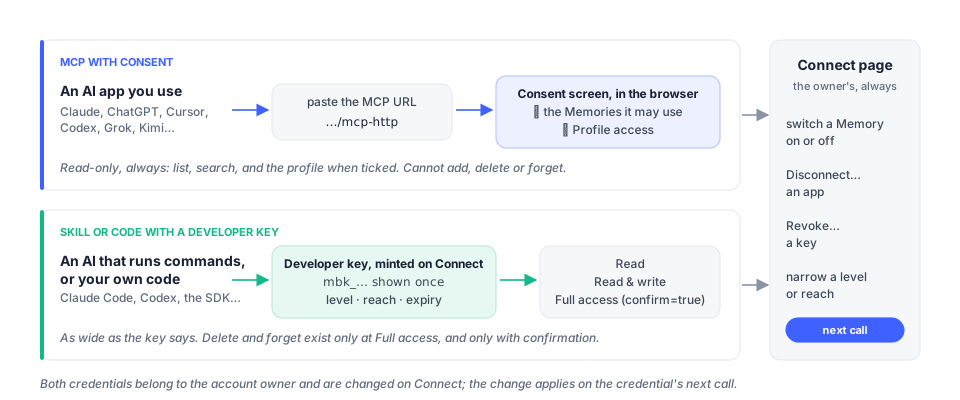
| For | How it authenticates | What it gets | |
|---|---|---|---|
| MCP with consent | an AI app the person uses: Claude, ChatGPT, Cursor, Codex, Grok, Kimi, VS Code, Windsurf… | the app discovers OAuth, the browser opens Membase’s consent screen, the person ticks the Memories the app may use and whether it may read their profile | list_containers, search_memories and, when ticked, get_profile. Read-only by design. |
| Skill with a developer key | an AI that reads pages and runs commands: Claude Code, Codex, Cursor’s agent, Kimi Code | a developer key the person minted | the key’s access level, up to Full access |
The account owner can change or revoke either connection from the Connect page, and the change applies on the credential’s next call. Access control has the rules.
MCP server address
Section titled “MCP server address”Paste this into your client’s remote MCP setup:
https://api.app.membase.io/mcp-httpThe transport is Streamable HTTP. Supported clients open a browser for consent; the client guides show their setup steps. Some clients also accept a developer key in an Authorization header, with the permissions of that key.
The skill, in one sentence
Section titled “The skill, in one sentence”Tell the AI:
Install Membase from https://www.app.membase.io/skill using key mbk_…
That address is the skill’s SKILL.md with an install preamble. The AI fetches the folder,
keeps the key as MEMBASE_API_KEY and calls the REST API with it. Connect’s Skills tab
writes the sentence for you, key included. An AI that already has Membase MCP tools uses
those and keeps the skill for its rules.
The pages
Section titled “The pages”Every client page has the same shape: before you start, set up, with a developer key, what it can do, which Memories it uses, remove it, and what to do when something looks wrong.
| Page | For |
|---|---|
| ChatGPT | the Plugins dialog, Developer mode if ChatGPT asks for it, per-chat enabling |
| Claude | the custom connector on claude.ai and the desktop app |
| Claude Code | claude mcp add, a key in the header, the skill |
| Cursor | mcp.json, project or global |
| Codex | codex mcp add, config.toml, the IDE extension |
| Grok | a custom connector on grok.com; no tile of its own, listed under Other apps after consent |
| Kimi Code | kimi mcp add; no tile of its own, listed under Other apps after consent |
| Any MCP client | the server itself: discovery, the header alternative, what tools/list shows, the ready-made config files, VS Code, Windsurf, Devin and every client without a page |
| Access control | consent vs key, reach, the profile tick, confirmation, revocation |
| Troubleshooting | every word and status a client can show, and what to do |
What connecting looks like
Section titled “What connecting looks like”- The person pastes the URL into the app, or runs the app’s
mcp addcommand. - The app answers with a browser window: Membase’s consent card, listing the Memories with a tick each and Profile access for the profile.
- The person presses Approve access. The app’s tile on Connect says Authorized · awaiting first use; its page lists what it Uses. An app without a tile in the catalog (Grok, Kimi Code, any other MCP client) appears under Other apps once the consent completed, and only then has a page.
- In a chat, the person asks “List my Membase containers.” Check that it names the Memory you granted. Then ask about a specific fact from its material and check the answer. An empty list means no Memory is switched on for this connection yet.
Connecting is the account’s, once. Which Memories an app uses is the Memory’s, and the switch on the app’s page and the switch on the Memory’s Use in card are the same switch. The Connect page itself, tab by tab, is on Connect in the user guide.
Related tasks
Section titled “Related tasks”- To import conversations into memory, use the browser extension.
- To talk to Membase’s own assistant from your phone, use Telegram.
- To build your own integration, use the API quickstart.