Claude API
The user’s memory behind Claude: point the request at Membase’s MCP server with the key as its token, or wrap the SDK in your own tools and let the tool runner loop.
Two shapes. The first needs no tool code: the Claude API calls Membase’s MCP server for you. The second wraps the SDK in tools of your own, when you want to shape what the model sees.
Everything below assumes MEMBASE_API_KEY in the environment, minted at Read & write
with Your profile ticked (Authentication & Scopes), and your model
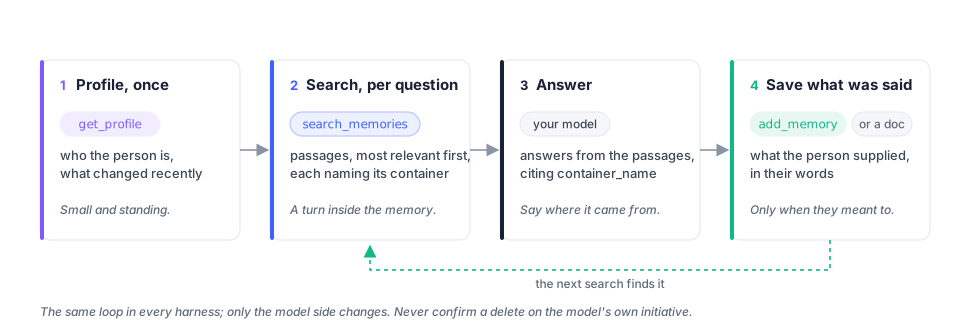
provider’s key beside it. The loop is the same in every harness:
Membase as a remote MCP server
Section titled “Membase as a remote MCP server”The Claude API can call a remote MCP server on your behalf. Name Membase’s server, hand it the developer key as the authorization token, and Claude gets the key’s tools without a line of tool code:
import osimport anthropic
client = anthropic.Anthropic()
response = client.beta.messages.create(    model="claude-opus-5",    max_tokens=16000,    betas=["mcp-client-2025-11-20"],    mcp_servers=[{        "type": "url",        "url": "https://api.app.membase.io/mcp-http",        "name": "membase",        "authorization_token": os.environ["MEMBASE_API_KEY"],    }],    tools=[{"type": "mcp_toolset", "mcp_server_name": "membase"}],    system="Read get_profile first. Use search_memories before answering about the user's "           "past work or decisions, and cite the container_name of anything you use.",    messages=[{"role": "user", "content": "What did we decide about the ledger, and why?"}],)
for block in response.content:    if block.type == "text":        print(block.text)
import Anthropic from "@anthropic-ai/sdk";
const client = new Anthropic();
const response = await client.beta.messages.create({ model: "claude-opus-5", max_tokens: 16000, betas: ["mcp-client-2025-11-20"], mcp_servers: [{ type: "url", url: "https://api.app.membase.io/mcp-http", name: "membase", authorization_token: process.env.MEMBASE_API_KEY!, }], tools: [{ type: "mcp_toolset", mcp_server_name: "membase" }], system: "Read get_profile first. Use search_memories before answering about the user's " + "past work or decisions, and cite the container_name of anything you use.", messages: [{ role: "user", content: "What did we decide about the ledger, and why?" }],});
for (const block of response.content) if (block.type === "text") console.log(block.text);The tool list Claude sees is the key’s: a Read key offers list_containers,
search_memories, list_documents, memory_rules and, with Your profile ticked,
get_profile (get_document is REST-only and not offered over MCP); a Read & write key adds
add_memory and add_document. To keep a conversation read-only, mint a Read key for it.
Your own tools over the SDK
Section titled “Your own tools over the SDK”When you want to shape what the model sees (a smaller tool surface, your own descriptions, a result format of your choosing), wrap the SDK and let the tool runner drive the loop:
import anthropicfrom anthropic import beta_toolfrom membase import Membase
memory = Membase()                       # MEMBASE_API_KEYclaude = anthropic.Anthropic()
@beta_tooldef search_memories(q: str) -> str:    """Search the user's memory. Use it before answering anything about their past work,    decisions or preferences.
    Args:        q: the question, in natural language.    """    hits = memory.search(q, limit=5)["results"]    return "\n".join(f"[{h['container_name']}] {h['content']}" for h in hits) or "nothing found"
@beta_tooldef remember(content: str) -> str:    """Save one fact the user asked to remember, in their own words.
    Args:        content: the fact.    """    memory.memories.add(content)    return "saved"
profile = memory.profile()runner = claude.beta.messages.tool_runner(    model="claude-opus-5",    max_tokens=16000,    system="Standing facts about the user: " + "; ".join(profile["static"]),    tools=[search_memories, remember],    messages=[{"role": "user", "content": "Remind me why we picked Postgres, then note that we'll revisit it in Q1."}],)final = runner.until_done()print(next(b.text for b in final.content if b.type == "text"))
import Anthropic from "@anthropic-ai/sdk";import { betaZodTool } from "@anthropic-ai/sdk/helpers/beta/zod";import { z } from "zod";import { Membase } from "membase-sdk";
const memory = new Membase(); // MEMBASE_API_KEYconst claude = new Anthropic();
const searchMemories = betaZodTool({ name: "search_memories", description: "Search the user's memory. Use it before answering anything about their past work, decisions or preferences.", inputSchema: z.object({ q: z.string().describe("the question, in natural language") }), run: async ({ q }) => { const { results } = await memory.search({ q, limit: 5 }); return results.map((h) => `[${h.container_name}] ${h.content}`).join("\n") || "nothing found"; },});
const remember = betaZodTool({ name: "remember", description: "Save one fact the user asked to remember, in their own words.", inputSchema: z.object({ content: z.string() }), run: async ({ content }) => { await memory.memories.add({ content }); return "saved"; },});
const profile = await memory.profile();const final = await claude.beta.messages.toolRunner({ model: "claude-opus-5", max_tokens: 16000, system: "Standing facts about the user: " + profile.static.join("; "), tools: [searchMemories, remember], messages: [{ role: "user", content: "Remind me why we picked Postgres, then note that we'll revisit it in Q1." }],});for (const block of final.content) if (block.type === "text") console.log(block.text);remember calls memories.add without a container, which works while exactly one Memory is
in the key’s reach; pass container= once there are several.
Rules that hold in every shape
Section titled “Rules that hold in every shape”The same rules, with the reasons, are on Memory operations.
- Profile once, search per question. The profile is small and standing; search is a turn inside the user’s container.
- Cite the container. Every hit names
container_name; say where an answer came from. - Save what the user supplied, in their words, and only when they asked or plainly meant to.
- Never confirm on your own. A delete or forget without
confirm=trueanswers with ahowsentence; relay it and stop. - Treat
403as withdrawn access. The owner narrowed or revoked the key; do not retry with it. - Expect the first search to be slow. Up to a minute after a quiet spell; keep the SDK’s timeout.