Platform overview
The hosted Membase at app.membase.io as your code meets it: the three nouns, what each screen of the app is to the API, credentials, one account per person, limits, the Marketplace, and what can be undone.
The Memory Platform is the hosted Membase at https://www.app.membase.io. A person hands it
material once; it keeps a living memory of that material; every AI they connect, and every
key they mint, reads the same memory. The mechanism is on
How Membase works; this page is the product around it, written for
someone whose code will meet what the person sees. The screens themselves, one page each,
are in the Use Membase tab.
The three nouns
Section titled “The three nouns”| API | In the app | What it is |
|---|---|---|
| container | a Memory | one named space of memory, with the agent that keeps it and the material it reads |
| memory | an item on a Memory’s page | one fact the container holds, or one fact of the user’s profile |
| document | a row under a Memory’s sources | one piece of raw material a container read: a file, a note, a page |
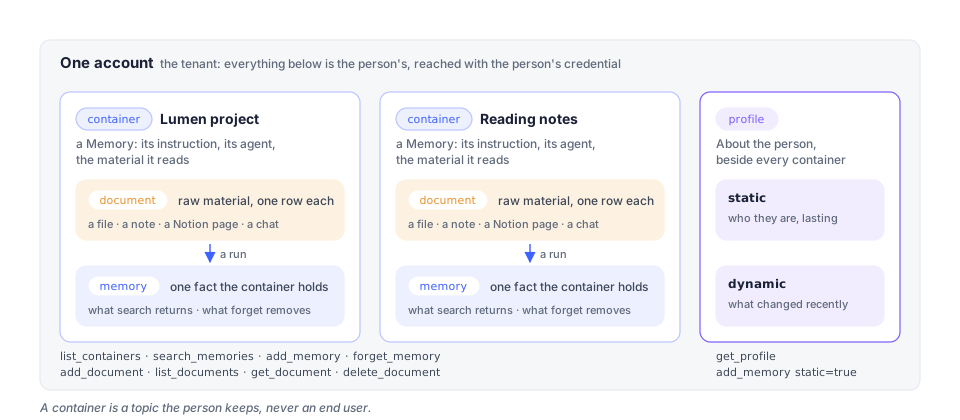
Plain verbs: list, search, get, add, delete, forget, ask.
Memory operations walks them; the API reference
has every operation.
A profile sits beside the containers: the standing facts the assistant keeps about the
user (static) and the most recently changed ones (dynamic). get_profile reads it;
add_memory with static=true writes to it.
The screens
Section titled “The screens”| Screen | The person uses it to | Your code meets it as |
|---|---|---|
| Home | talk to the assistant, the one agent that is theirs by default; reach it on Telegram | the profile it keeps; the assistant’s own memory is not a container |
| Memory | make, run and inspect Memories | list_containers, search_memories, the items forget_memory removes; learned turning true after a run |
| Files | keep files, and hand folders, uploads, Notion pages and captured conversations to a Memory | add_document, list_documents, get_document, delete_document |
| Studio | edit a Memory’s pipeline canvas | nothing; a canvas run as an endpoint is workflow_invoke over MCP |
| Agents | build agents beyond the assistant | ask_agent on an agent-endpoint credential |
| Schedules | run Memories on a cadence | learned turning true without a call of yours |
| Activity | see what ran | the run a 202 from add_document started; a key’s own calls are on the key’s page |
| AI Setup | choose the account’s model | 422 · capability_unavailable when there is none |
| Connect | let an AI app read Memories, mint keys | consent tokens and developer keys: Authentication & Scopes |
| Marketplace | sell and buy access to a Memory | subscriptions, ask_agent |
| Settings | plan, export, delete | 422 · reason: dormant on a free plan whose turns are spent |
Credentials
Section titled “Credentials”Every call carries a bearer: a developer key the owner minted, or a consent token an app received on the OAuth consent screen. A key has a level (Read, Read & write, Full access), a reach (the Memories it may use) and an expiry; a consent token is read-only and reaches what the user ticked. Both are managed by the account owner in Connect. Authentication & Scopes has the whole model; the keys screen is under Connect in the user guide.
A key’s calls are on the key’s page, not on Activity: Usage (calls in the last 30 or 7
days, how many were refused, the tool it calls most) and Recent activity (each call:
tool, Memory, what came back, when; a refused call in red with the reason). The same numbers
are on GET /v1/api-keys/{id}/usage with the owner’s session.
One account per person
Section titled “One account per person”The account is the tenant. A container is a topic, not an end user. A product that serves many people gives each of them their own Membase account, and reads their memory with their own key or their own consent; there are no application-wide keys and no sub-tenant tags. Multi-user isolation has the patterns.
Models
Section titled “Models”Every learning turn, every search and every assistant answer needs a model. The account
chooses it under AI Setup: a key of its own for a provider, or a Claude or ChatGPT
subscription. Follow the connection and verification steps shown in AI Setup. An account with no working model keeps
its stored memory, but learning and hosted search need working agent turns. A search may
return per-Memory failures in containers[].error; documents can remain unread.
How Membase works.
Limits and errors
Section titled “Limits and errors”Search can report per-Memory failures in containers[].error on an HTTP 200. Check that
field before treating an empty result as “nothing found.” API troubleshooting
covers partial failures, deferred learning and timeouts.
| Status | Code | When |
|---|---|---|
| 400 | validation |
an empty q, both or neither of content and url, container omitted when more than one is in reach |
| 403 | unauthorized |
outside the credential’s reach, or a verb above its level |
| 404 | not_found |
an unknown document or memory id |
| 422 | validation |
a missing or mistyped body field; read code to tell it from the row below |
| 422 | capability_unavailable |
the account’s memory cannot run a turn here (no agent container, no model) |
| 422 | reason: dormant |
a free-plan account whose free turns are spent |
| 429 | rate_limited |
the account’s concurrent-turn budget; retry later |
Uploads through add_document are capped at 32 MiB per file, on every plan. An account on
the free plan whose free turns are spent keeps its memory but cannot run turns until it
brings a model of its own under AI Setup or moves to a paid plan.
Marketplace
Section titled “Marketplace”A listing is an agent endpoint (or a workflow endpoint): the buyer’s credential calls
ask_agent (or workflow_invoke) and gets answers, never files. The earlier snapshot and
live-memory listing kinds were retired and can no longer be created; a few pre-existing ones
may still render for their buyers. Check the listing’s Included access section.
Marketplace.
Stopping and undoing
Section titled “Stopping and undoing”Revoking a key or disconnecting an app changes subsequent access. It does not erase content already received by the client. Pausing a schedule stops future scheduled runs; subscription changes follow the terms and dates shown for that purchase or plan.
Deleting a Memory removes its stored content. Deleting a conversation removes the transcript but retains information already saved to memory. Deleting account data retains the sign-in identity. Review the confirmation and export data you want to keep before deleting. Concepts.