Home
Your conversation with the Assistant: the rail, the entry cards, the composer, and the remote channel.
Home is your conversation with the Assistant. Everything else in the product feeds this page.
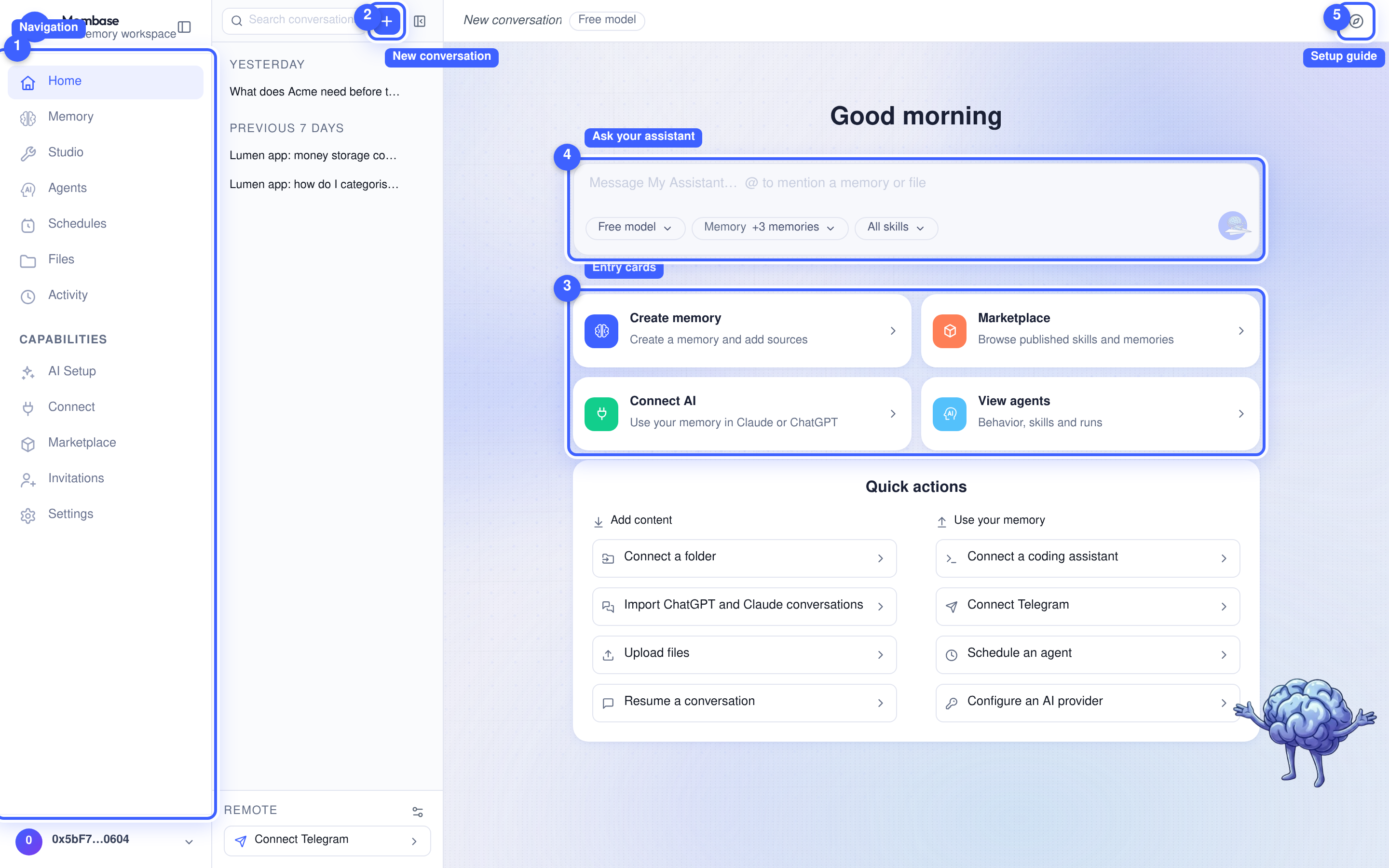
- Navigation. The left rail. Flat items first, then a Capabilities group.
- New conversation. Starts a draft row at the top of the rail. The first message turns it into the real conversation.
- Entry cards. Create memory, Marketplace, Connect AI and View agents open their respective pages or setup steps. Quick actions below them provides shortcuts for adding content and using your memory.
- The composer. The conversation box; its placeholder reads Message
… and@mentions a memory or file. Enter sends, Shift+Enter breaks a line. - Setup guide. Replays the first-run guide from its name card.
The conversation rail
Section titled “The conversation rail”The rail lists your conversations grouped by day: Today, Yesterday, Previous 7 days, Older. Each row’s menu offers Rename, Branch and End. Ended conversations fold away at the bottom; they stay readable and the assistant can still search them, but they take no more turns. Their menu offers Delete conversation, which asks for confirmation.
At the foot of the rail, Remote holds the assistant’s Telegram chat. Connect Telegram opens the connection steps; once connected, the row opens a read-only view of that chat. See Telegram below.
The box
Section titled “The box”The three things you change mid-conversation sit along the bottom edge of the box: the model source, the memories to consult, and the skills. Send is at the right.
| Key | Does |
|---|---|
| Enter | send |
| Shift+Enter | new line |
| ↑ | recall your last question |
| Esc | stop the current reply |
| ⌘⇧O | new conversation |
The transcript
Section titled “The transcript”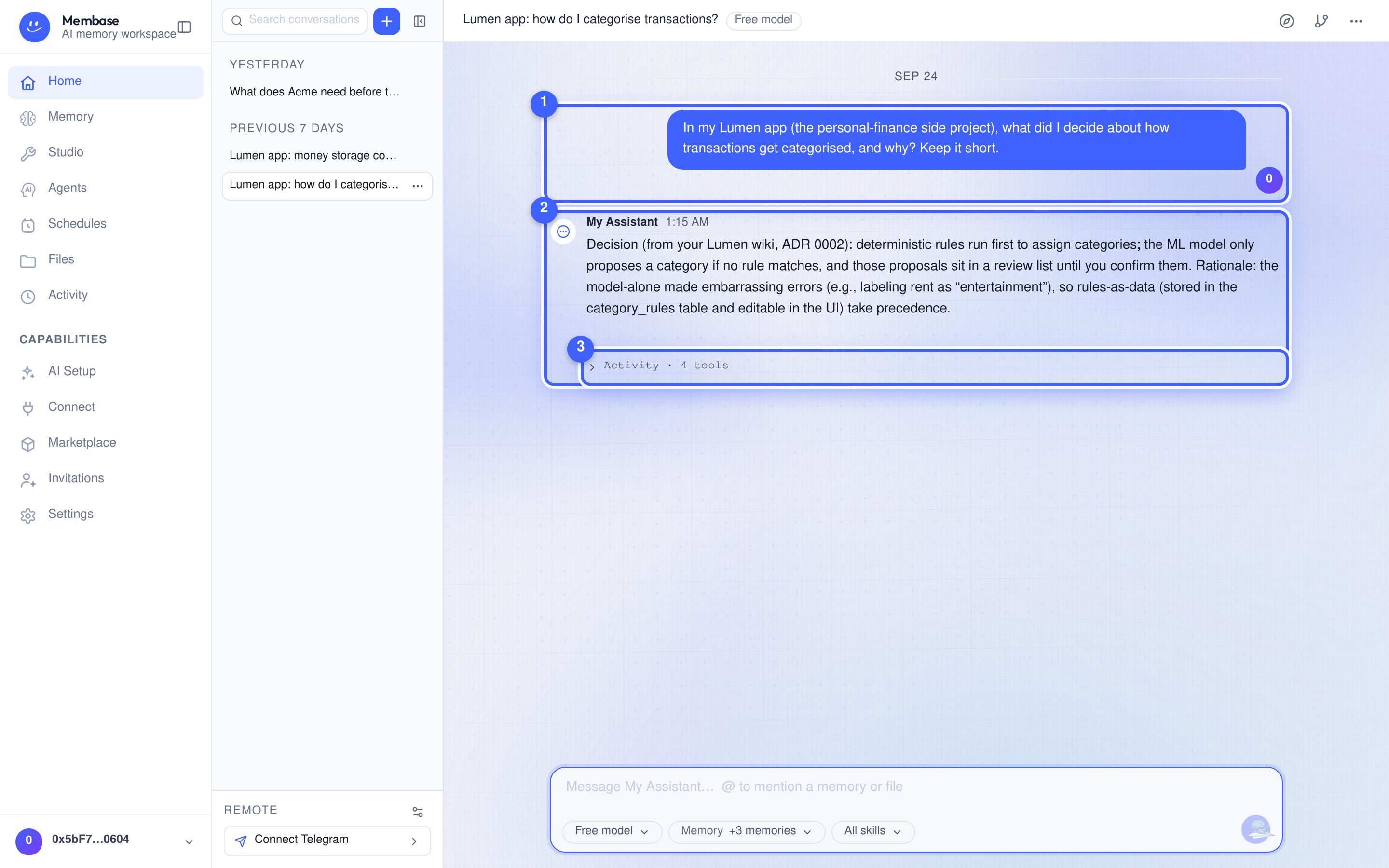
- Your message. In a bubble on the right, beside your account disc.
- The answer. Rendered under the assistant’s mark and name. When it comes from your memory, the assistant says so and names the page it read.
- Activity. Folded under the answer: which tools ran, including the memory it recalled.
Day separators replace a time on every line. Hovering a message shows Copy, Retry, Edit & resend and Branch. Under an answer you may also see memory traces such as Saved to memory or Recalled an earlier conversation. A New reply pill appears when an answer lands while you have scrolled up.
Assistant settings
Section titled “Assistant settings”The ⚙ Assistant settings button beside Remote, at the foot of the conversation rail,
opens its settings as a dialog over the conversation (/?settings=assistant opens it too). One
scroll, no tabs, every field saved as it changes: name, instructions, memories, skills, its
Telegram chat, and the model card (which source answers and which model).
Telegram
Section titled “Telegram”Use the Remote row below the conversation list to open a connected Telegram chat or connect a new one. It shares the assistant’s memory but keeps a separate conversation. The Telegram guide covers setup, scheduled results and disconnection.
Three verbs
Section titled “Three verbs”| Verb | Effect | Reversible |
|---|---|---|
| New conversation | opens a conversation | – |
| End | closes it; still readable and searchable | no more turns |
| Delete conversation | deletes the transcript; previously saved memory is retained | no |
If something looks wrong
Section titled “If something looks wrong”Look up the word on screen.
| It says | What it means | Do |
|---|---|---|
| AI is unavailable | no model source | AI Setup › Connect a key or a subscription |
| the reply spins | first reply after a quiet period wakes the assistant | wait; if it does not land, Retry |
| New reply pill | an answer landed while you scrolled up | click it |