How Membase works
How documents become memory, how search behaves, and how models and access settings affect API calls.
This page describes the behavior an integration needs to handle: learning from documents, searching memory, choosing a model and checking access.
Accounts and Memories
Section titled “Accounts and Memories”Each account owns its Memories, sources and access settings. In the API, a container is
one Memory within that account. Use the account owner’s credentials and select the appropriate
container; do not use containers as isolation boundaries between different users.
Multi-user isolation.
Material becomes memory in a learning turn
Section titled “Material becomes memory in a learning turn”A Memory has an instruction describing what to retain and sources containing material to process. Adding or syncing a source does not mean the Memory has learned its contents.
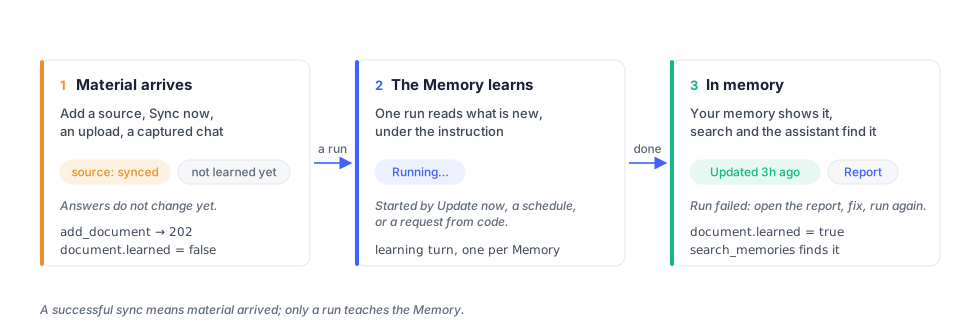
Select Update now in the app or configure a schedule to process sources. The API’s
add_document also requests learning and returns 202; this acknowledges acceptance, not
completed learning. Check the document’s learned flag before searching for the new content.
If processing fails, resolve the reported issue and update the Memory again.
Memory operations.
A search is a turn
Section titled “A search is a turn”search_memories retrieves relevant passages from the selected Memories. Each result names
its container. ask_agent returns an agent’s answer and is available only to credentials
that expose an agent.
- Allow time for startup and retrieval. A request after inactivity can take longer. The SDKs default to a 90-second timeout; some requests may need longer.
- Check partial failures. An HTTP
200can still containcontainers[].error. Do not report an empty search as “nothing found” until you have checked those errors. - Check what the limit left out. A Memory marked
containers[].truncatedhad passages that did not fitlimit; its silence is about the budget, not about what it knows. Raiselimitor name that Memory withcontainerto hear it. - Use the supported search fields. Search accepts
q, an optionalcontainerand alimit. Metadata filters are not supported; include relevant constraints in the query.
See API troubleshooting for timeouts and unavailable Memories.
The profile
Section titled “The profile”The profile holds information about the user separately from topic-specific Memories.
static contains lasting information and preferences; dynamic contains recent context.
Read it with get_profile when the credential grants profile access. Use add_memory with
static=true to add profile information.
Models
Section titled “Models”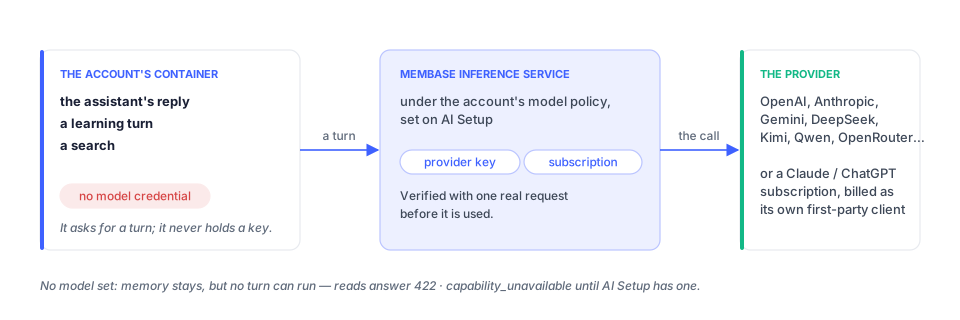
Learning, hosted search and assistant replies require an available model. The account owner configures supported providers or subscriptions in AI Setup and selects the assistant’s model source in its settings.
When a model is unavailable, stored memory remains, but learning or search may fail. A turn
can return 422 with code: capability_unavailable; search may instead report an error for
each affected Memory in containers[].error. A document can remain unread until the issue
is resolved and learning completes. A free-plan account may report reason: dormant after
its free allowance is used. Follow the returned recovery guidance.
Access and confirmation
Section titled “Access and confirmation”Developer keys have an access level, selected Memories and an expiry. MCP consent grants read access to the Memories the owner approves. Profile access is a separate setting. Changes to permissions apply to subsequent requests using the credential.
delete_document and forget_memory require Full access and confirm=true. Obtain the
owner’s confirmation before submitting either operation. Revoking a credential prevents
future access through it; it does not erase results already received by an external client.
Authentication describes the permission rules.
Where to go next
Section titled “Where to go next”| Task | Guide |
|---|---|
| Make a first call | Quickstart |
| Add, retrieve or remove content | Memory operations |
| Look up an operation | API reference |
| Map the app to API concepts | Platform overview |
| Connect an AI app | Connect your AI |
| Review engine evaluation results | Benchmarks |