Memory
The Memory page as one drive: tiles, a memory’s page, the status line, Settings, a source’s page, and what each word means.
The Memory page is one drive. Its root shows your memories as tiles; each memory opens as a page with the same anatomy.
The home page
Section titled “The home page”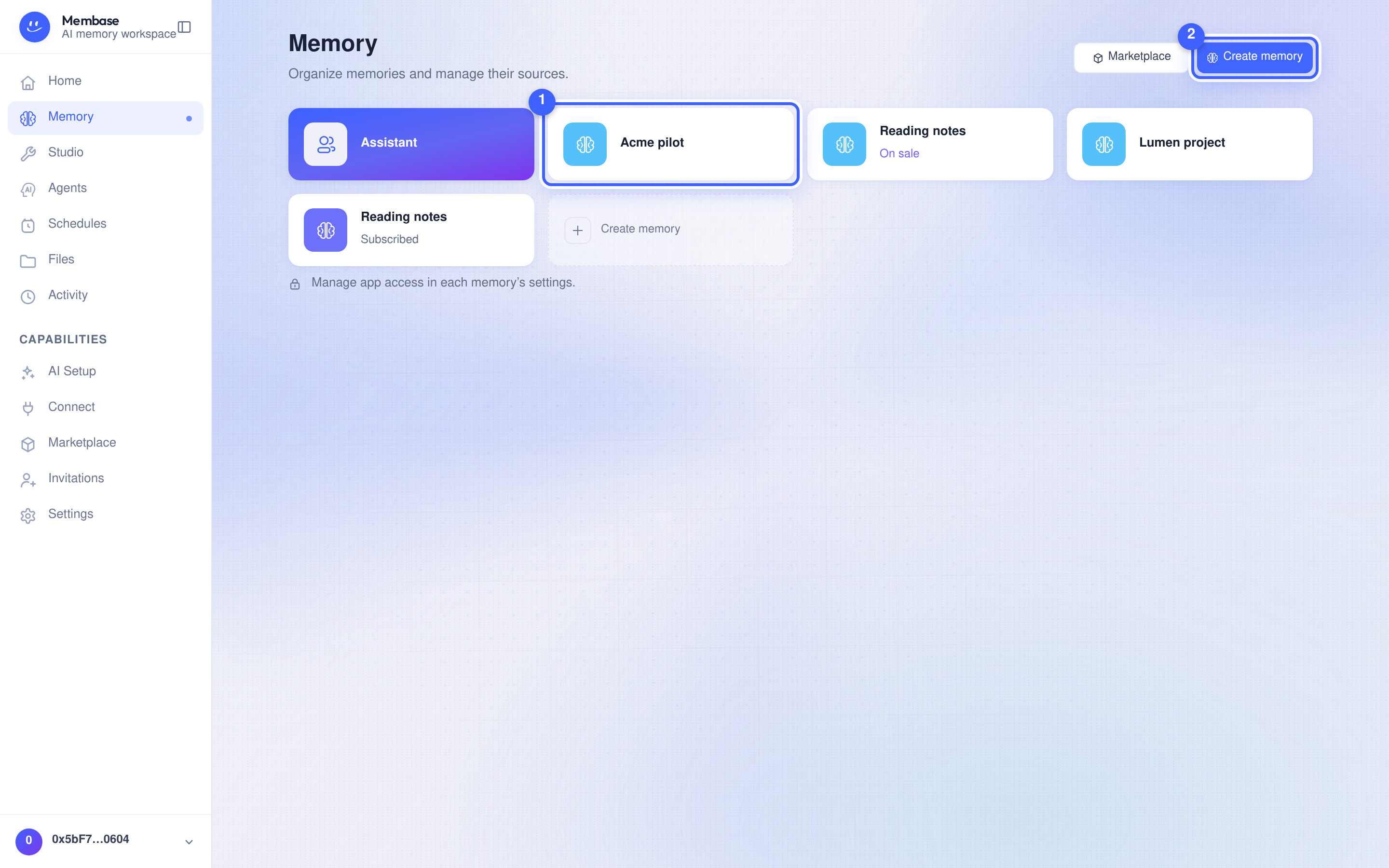
- A memory tile. Glyph, name, and a state word only when there is one: Add a source (reads nothing yet), On sale, Subscribed.
- Create memory. Opens the Create memory dialog. Marketplace beside it opens memories other people sell.
The Assistant’s own memory is always the first tile. The home page lists the Memories before reading their contents.
A memory’s page
Section titled “A memory’s page”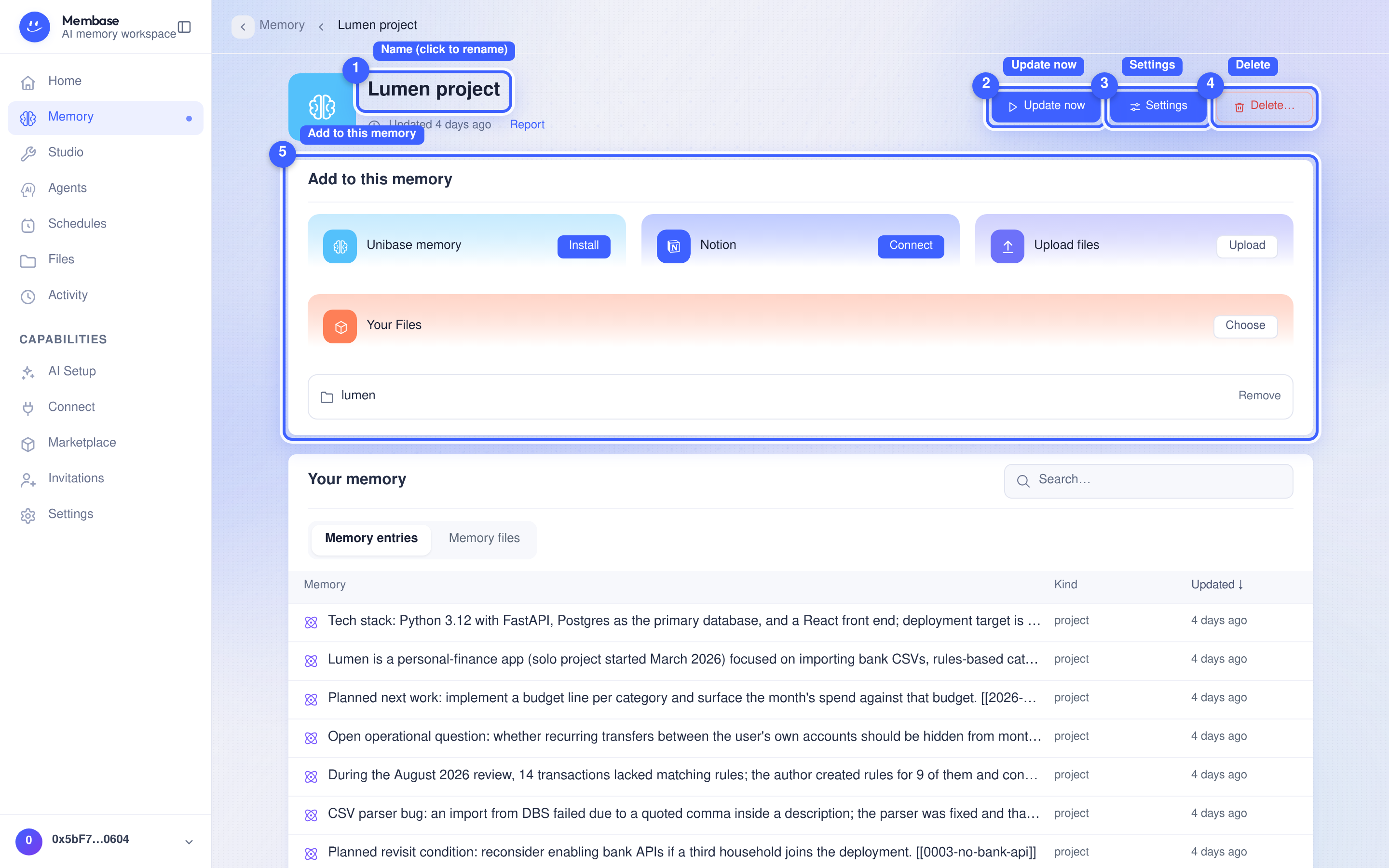
- Name. Click to rename in place.
- Update now. Process the Memory’s sources manually. The button is disabled while an update is running or when the sources are not ready.
- Settings. Configure the name, instructions, sources, schedule and sharing in one dialog.
- Delete… Says first the one irreversible thing (everything the memory learned goes with it), then what depends on it.
- Add to this memory. Choose Unibase memory, Upload files, Your Files, or Notion where available. Sources you added are listed below with a Remove per row. Sources explains each option.
Under the Add card:
- Your Memory. What this memory currently knows: search, a kind filter, one list of pages and facts. Click an item to read it in the right column.
- Use in. One switch per app you have connected. Connect an app when there is none.
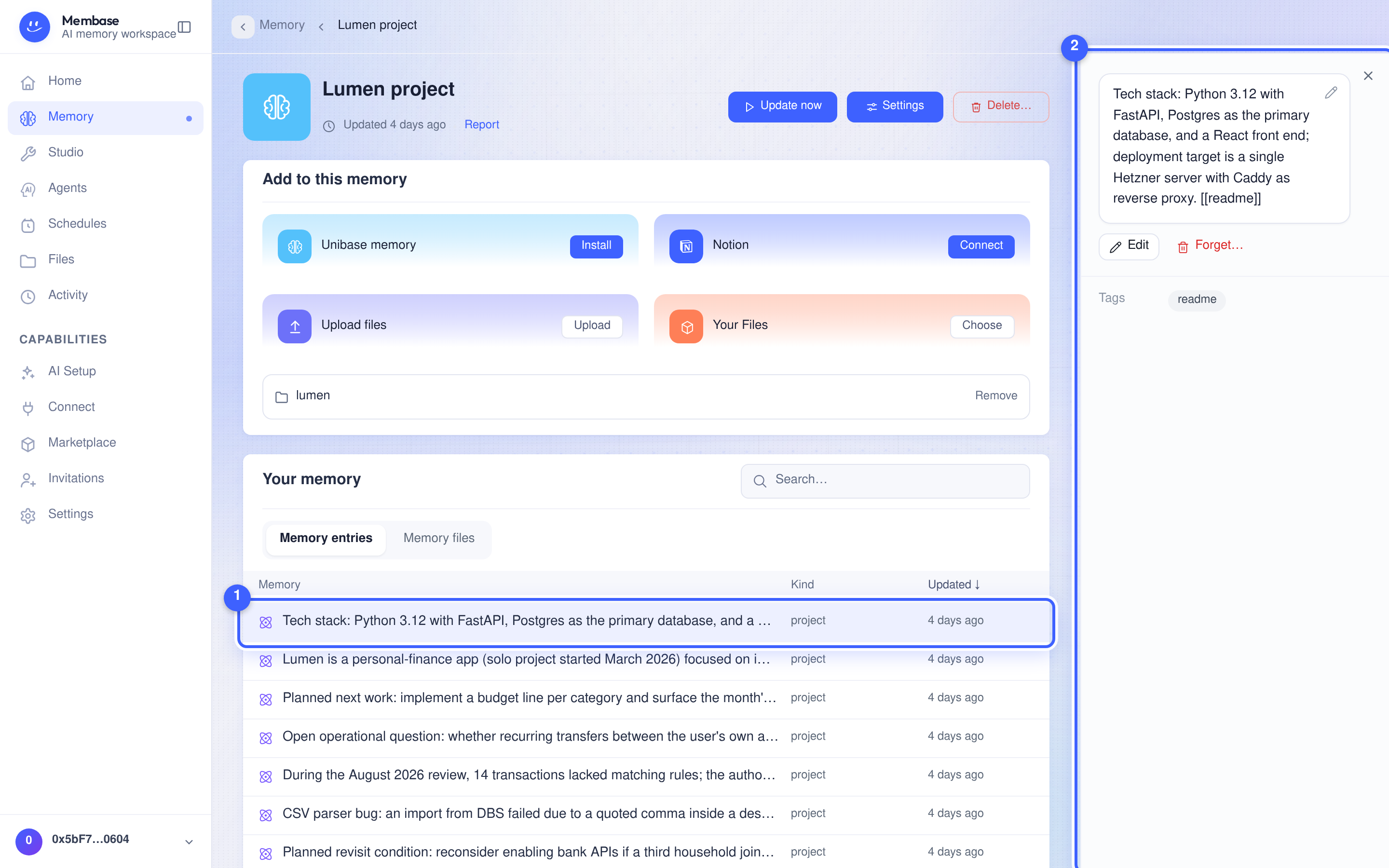
- An item. One thing the memory keeps, with its kind and when it was last updated. The list contains what the Memory learned and any corrections you made through Edit.
- The right column. The item’s full text, its tags, and Edit / Forget… for that one item.
The status line
Section titled “The status line”The line under the name is the memory’s state and nothing else:
| It says | Meaning |
|---|---|
| Not run yet | never run |
| Checking… | the page is reading the state |
| Running… | a run is queued or running; survives a reload |
| Updated 3h ago · Report | the last run read the current sources; Report opens what it did |
| Run failed | the last run failed; open the report, fix, run again |
| Run refused | the last run was refused before it did any work; Report says why |
| Run canceled | the last run was canceled |
| Starting memory… | the memory’s store is waking up |
| Unable to check this memory: … | the page could not read the state; the reason follows |
“Unread” is decided by versions, not clocks. A sync that changed nothing, or a run on another memory, cannot make this memory look up to date.
Settings
Section titled “Settings”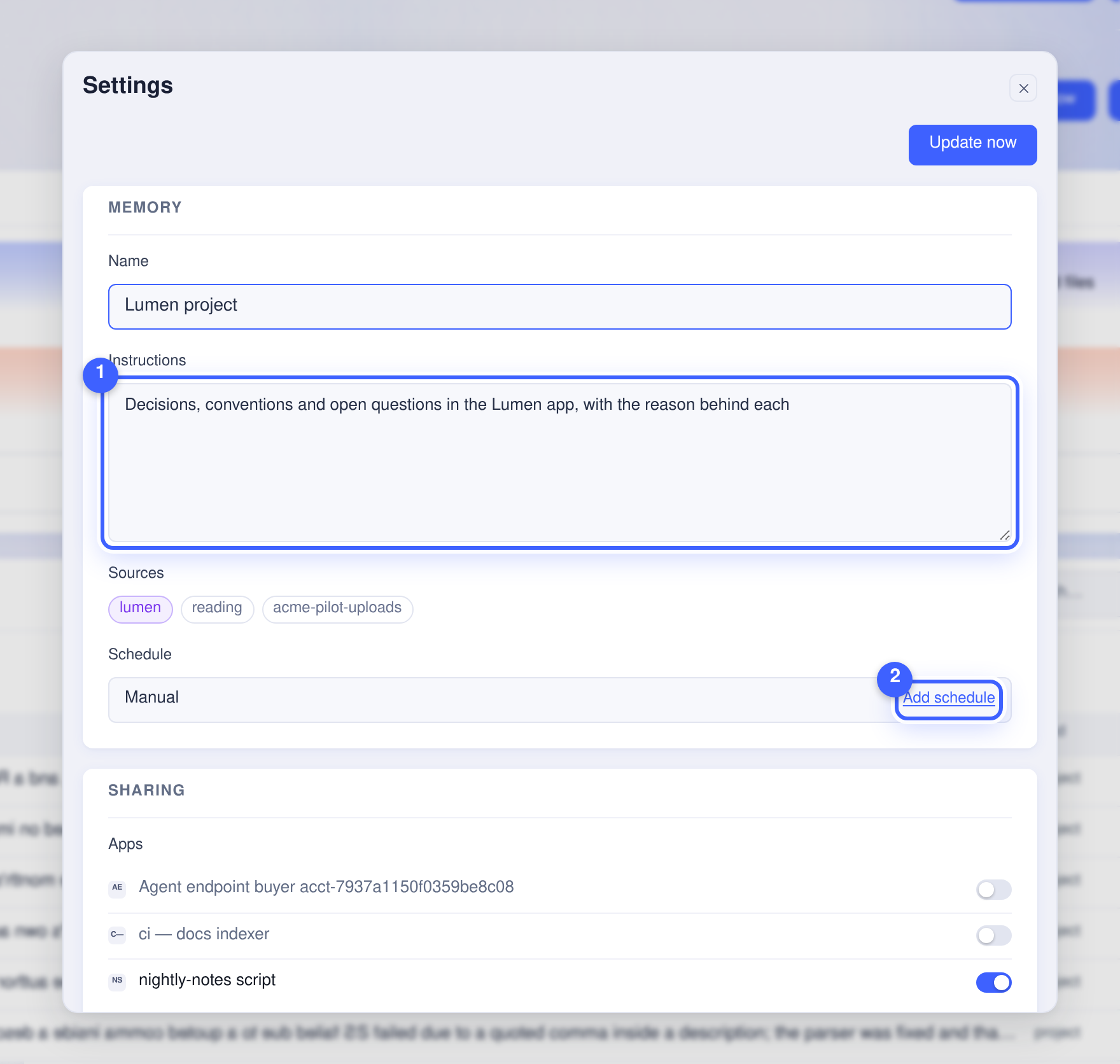
Every field saves as it changes. There is no Save button. The dialog has its own Update now at the top.
- Memory. Name, and Instructions: what the memory keeps. For a memory over your conversations, the instructions filter what the chats say, they are not a subject to write about.
- Sources. What this memory reads; each row opens the source’s page.
- Schedule. Manual until you Add schedule; then Change, Pause and Resume. Cadences are picked, not typed: hourly, daily, weekly, monthly, or a custom cron. Times are in UTC; the picker shows your local equivalent.
Below: Sharing (apps as switches, what depends on this memory, Sell / Unlist…) and Advanced (model, skills, its agent, Open in Studio).
A source’s page
Section titled “A source’s page”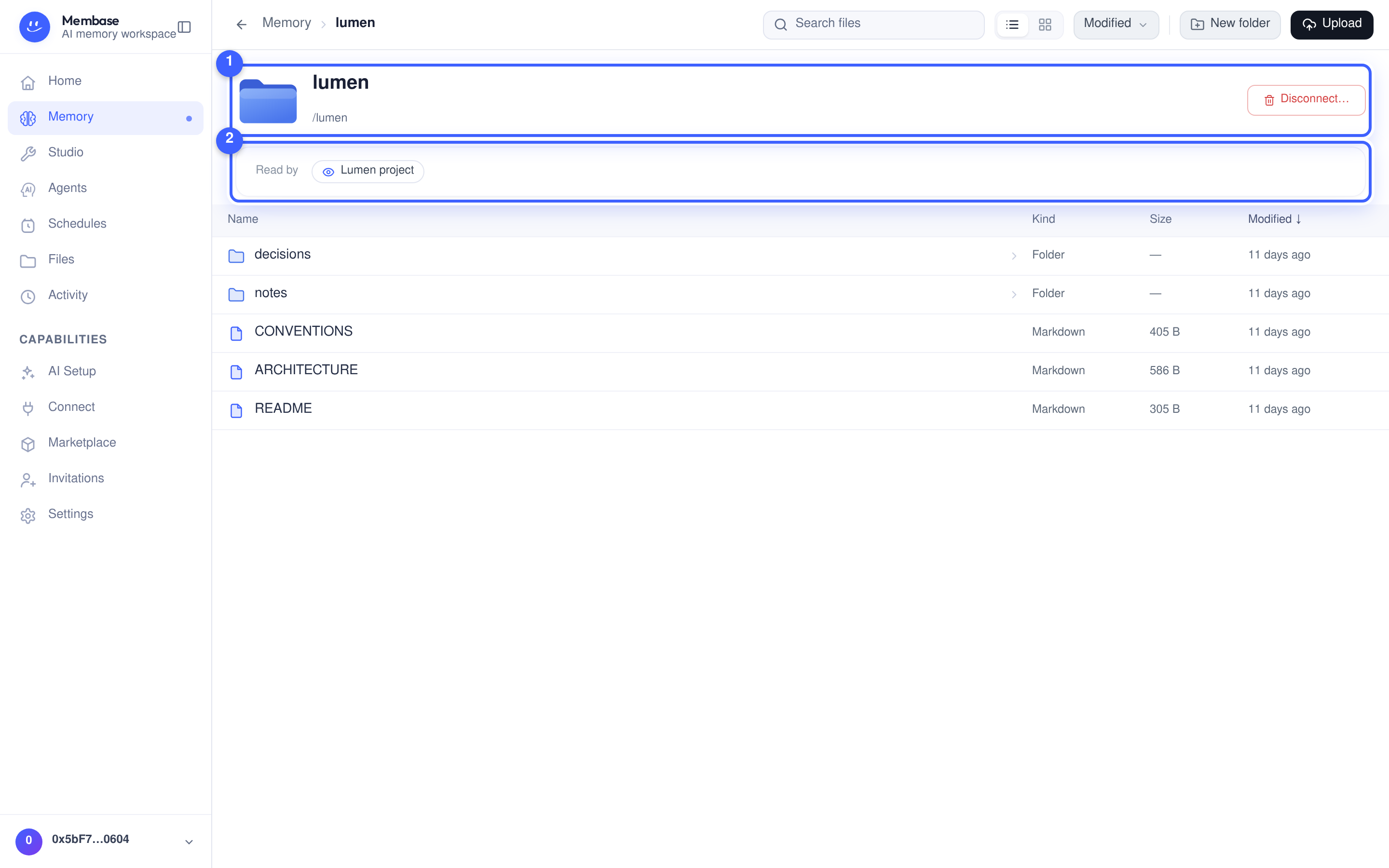
Each source has its own page, reached from Settings › Sources or from the Add card.
- Hero. The source and its path. A folder in your Files is read in place, so there is nothing to sync, and Disconnect… is its one verb. A connector source (Notion, Unibase memory) shows a status word here instead, with Sync now (Retry after a failed sync), Reauthorize or Reconnect when they apply, plus Manage… and Delete….
- Read by. Which memories learn from this source.
A folder source lists its files below, as an in-place workbench: open, rename, move, upload. A conversation source lists its transcripts.
If something looks wrong
Section titled “If something looks wrong”Look up the word on screen.
On the memory
Section titled “On the memory”| It says | What it means | Do |
|---|---|---|
| Update now is disabled | the memory has no source yet, or its state is still loading | add a source; wait for Checking… to finish |
| Update now | starts a manual update from the sources | select it to update the Memory |
| Run failed | the last run did not finish | open Report; usually the model source is off or a source needs reauthorization |
| Not run yet | never run | select Update now |
| Run refused | the run was refused before it started | open Report; usually no model source or no turns left |
| Add a source on the tile | reads nothing yet | Add card |
On a source
Section titled “On a source”| It says | What it means | Do |
|---|---|---|
| Queued / Syncing… | fetching raw material | wait; the memory reads it on its next run |
| Sync failed | the last fetch failed | Retry; if it repeats, the source may have moved |
| Needs reauthorization | the source’s own credential expired | Reauthorize |
| Access revoked / Disconnected | the source no longer grants access | Reconnect or remove it |